
Tell it what you drive
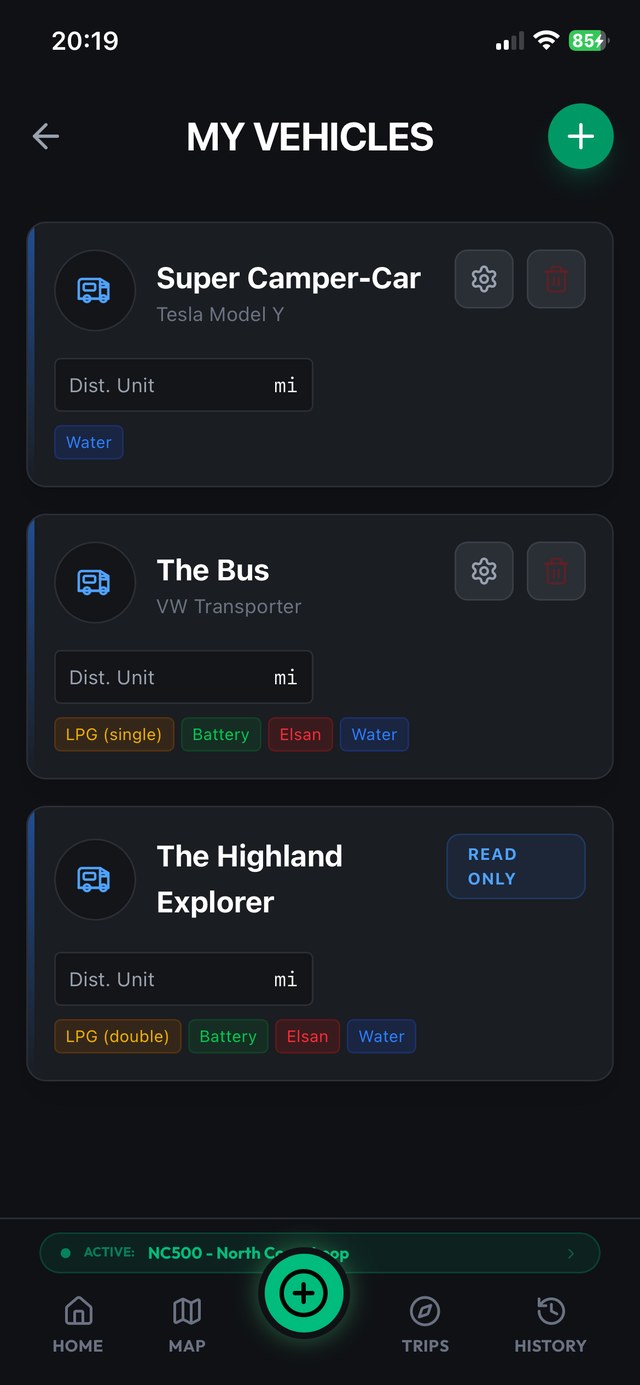
A vehicle profile starts simple: a name, make and model, the fuel type, and whether you think in miles or kilometres, which also makes the app at home in the US, Canada, Australia or New Zealand. Fuel type covers electric too, and choosing it changes what the app asks you about. The app was built in a coachbuilt motorhome, but the same profile fits a panel van conversion, an overland truck, or the family car on a camping trip. What matters is the next bit.
Toggle what's fitted
Vans differ, and most apps pretend they don't. Stops & Stays gives each vehicle a set of system toggles:
- LPG, including which type you carry
- Leisure battery
- Power station
- Toilet cassette
- Fresh water, with tank capacity
- Waste water
Switch on what's fitted, leave off what isn't, and the whole app follows suit. Only the systems your van has appear in the UI.
Why the blank fields matter
Every dead field in a logging app is a small tax you pay at the worst possible moment: parked up, tired, trying to record a stop before dinner. An app that asks a self-build with a compost loo about cassette levels is an app that gets abandoned by March.
The toggles feed straight into levels tracking, which records arrival and departure states for fuel, water, waste, LPG, battery and the rest, but only for the systems you switched on. No power station means no power station slider, ever. The form you fill in at a stop is exactly as long as your van demands and not one field longer.
A mate runs a VW T6 with no toilet, no LPG and a Jackery. His stop screen and mine look like different apps: his asks about the power station and fresh water, mine asks about the cassette and gas. Neither of us has ever scrolled past a field that doesn't apply, which is why we're both still logging in November.
More than one vehicle (Pro)
Plenty of people run more than one setup. The motorhome for the long trips, a day van for weekends, or the old van kept on while the new one gets sorted. The free tier covers one vehicle profile; Pro lets you create as many as the driveway holds, each honest about its own systems and its own odometer units.
Trips tie into this too: each trip carries a default vehicle, so when you switch trips from the dashboard the app already knows which van it's asking about. Records stay attached to the right vehicle, which is what makes the fuel figures in stats mean something later. A consumption chart that blends two different vans is worse than no chart.
Set it once, forget it
Profile setup is a one-off job on the sofa, done once per vehicle. From then on the app simply fits: right units, right systems, right questions. Levels, stops and the fuel figures in stats all inherit that setup automatically. If you are setting a van up for the first time, do it alongside the first motorhome trip checklist and the weighbridge trip.
Build your van's profile once
Set it up once and every log fits your layout, with unlimited vehicles on Pro. Ten stops free. No ties.